how to make a transparent histogram in matlab
July 18th, 2006 by Lawrence David
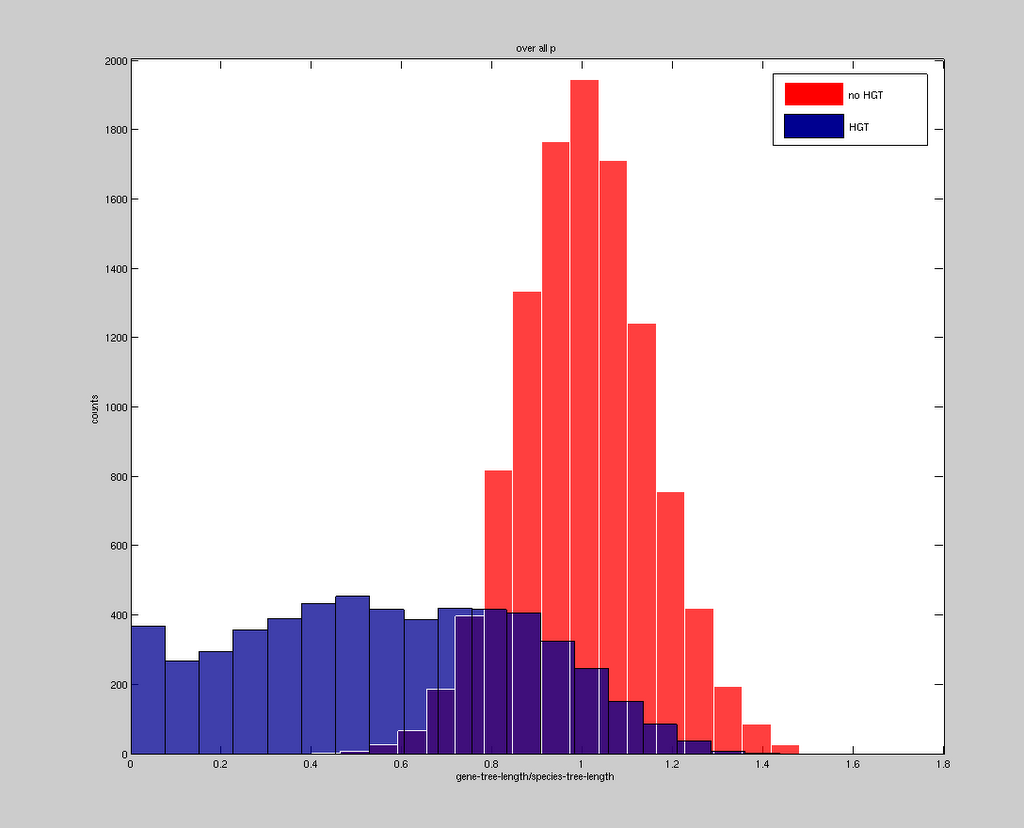

to make a partially transparent histogram in matlab, use the facealpha setting.
for instance, the following code produces the histogram seen above:
figure
hist(data1,20)
h = findobj(gca,’Type’,'patch’);
set(h,’FaceColor’,'r’,'EdgeColor’,'w’,'facealpha’,0.75)
hold on
hist(data2,20)
h = findobj(gca,’Type’,'patch’);
set(h,’facealpha’,0.75);
ylabel(‘counts’)
xlabel(‘gene-tree-length/species-tree-length’)
legend(‘no HGT’,'HGT’)
title(‘p = 0.5′);

Thank you, this was quite helpful.
Exactly what I was looking for, but when I declare the second (and third etc) h and change facecolor it happens to all the histograms, not just the last one.
yes. that is work in my chart. thank for sharing
Thanks for the trick
Thanks, this is great.
Do you know how to draw a histogram with errorbars, the errorbars depending on the number of points in each bin of the histogram?
If you couuld help, that would be great
Very helpful.
Jefferson:
Unless I am mistaken, findobj will return a vector with handles to all objects that fit the bill. If you want to modify this such that you can use multiple different colors or alphas, refer to each separately. Something like:
figure
hist(data1,20)
hold on
hist(data2,20)
h = findobj(gca,’Type’,’patch’);
set(h(1),’FaceColor’,’r’,’EdgeColor’,’w’,’facealpha’,0.75)
set(h(2),’FaceColor’,’b’,’EdgeColor’,’w’,’facealpha’,0.75)
ylabel(‘counts’)
xlabel(‘gene-tree-length/species-tree-length’)
legend(‘no HGT’,’HGT’)
title(‘p = 0.5′);
I would also like to know how to add errorbars, please Thanks!
thanks, it’s perfect
agree with anon, you wanna plot the data first then get the handles to the objects for changing the patch options
Is anyone else having trouble with the transparency in Matlab 2014a?
http://www.mathworks.nl/help/matlab/ref/alpha.html
Adam please check the link above
spencer diamonds guarantees
how to make a transparent histogram in matlab » from the desk of stinkpot
I get problems with Matlab 2014a. Some patch areas are added to the histogram. Is it a version bug?
Hi Lawrence,
This is really nice but I think this is dependent on OpenGL and fails if it is not supported. Plus, the figures are not exported to EPS/PDF. If you save the figure as EPS, Matlab saves it as a raster image.
In general, I am not very happy with Matlab’s vector graphics support. There are multiple issues. EPS/PDF files have messed up co-ordinates. This you realize when you position the figures in LaTeX. EPS files generated by image and imagesc get distorted when opened in a different application such as inkscape. So, transparent histograms using ‘facealpha’ are good as long as you are happy with raster images.
Thanks again.
Thanks, helped me a lot. Do you have an idea how to add Kernel density function on the histograms? Thanks again